The Vertical Codebase


I’ve always had opinions about how to “properly” structure a codebase. I think most engineers do. My stance has obviously evolved over time as things changed, but I found a tweet of myself from two years ago that I still 100% agree with:

components / hooks / types / utils (and constants) is the split I’m seeing in many codebases, yet it’s the one I dislike the most. It groups by type, not by domain. “useTheme” will live next to “useTodo”, but not next to ThemeProvider … why?
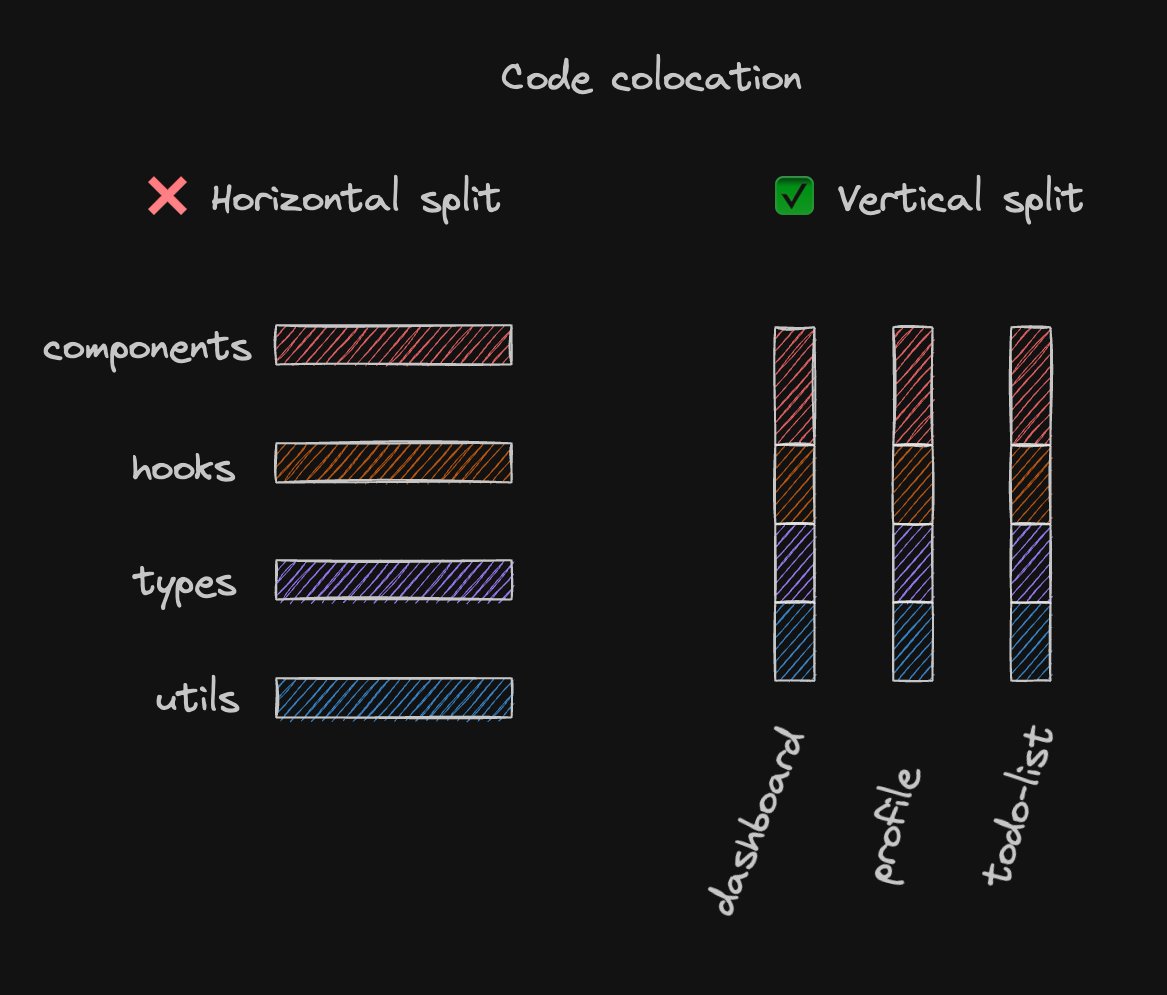
Why indeed? 🤔 The horizontal split has never made sense to me. I guess it’s convenient when you’re starting out, but that’s about it. Most of the things you write will be components anyway, and the other folders might just have a couple of files.
Of course, over time, this becomes a nightmare, and once you have it in place, it’s very hard to get rid of. Once again, the Sentry codebase is a good example. 10+ years of product development with this structure has lead to over 200 files in the top level components directory (opens in a new window). What they have in common? That they are components. Nothing else.
From analyticsArea to workflowEngine, you’ll find everything in there. Well actually, you’ll likely find nothing, because you don’t know where to start looking.
If your startup is NGMI Not Gonna Make It , the structure likely doesn’t matter. Maybe that’s why most people don’t think it’s a problem - because they can’t envision how this might look years from now. But once you get to a position where you’ve “made it”, taking steps to make sure your codebase can survive the scale and growth seems like a good idea. And getting rid of the horizontal structure is a good start.
Some engineers never look at any code ever again, because agents do all the things - writing, reviewing, fixing - in a fully automated way. If you’re in the camp that firmly believes that even if you’re drowning in tech debt, the next model will just throw everything away and re-write it in a weekend, this blogpost is likely not for you. But then again, if you don’t read code, you likely don’t read blogposts either, so this seems like an empty Venn diagram anyway. If you’re here, you very likely care.
Matt Pocock (opens in a new window) gave a great talk last week at the AI Engineer Europe event about Why Software Fundamentals Matter More Than Ever (opens in a new window), and I think he’s right.
In my opinion, agents need mostly the same things humans need to work efficiently: boundaries, constraints, and fast feedback loops. That includes a project structure that is easy to navigate, a good setup of lint rules and TypeScript, as well as a fast and reliable test suite. That’s why agents are so good at new codebases, but not very effective on codebases that have grown organically over years.
So yes, we should very much care, even if we don’t have to navigate the codebase ourselves.
Cognitive Load is what matters (opens in a new window), and having to jump around a codebase a lot unnecessarily adds to that. Code that changes together should live together. Most people I know would not move the props of a component to a separate file. It’s usually:
export type WidgetProps = { id: string }
export function Widget(props: WidgetProps) {}That makes sense. We’ll want to see what props are when we read or change the component without having to navigate away. We can also export the WidgetProps if we need them somewhere else.
Still, in a horizontal structure, this file would live in src/components/widget.tsx. The props are an integral part of the component, it’s public interface, so we likely won’t think twice about this colocation. This is good.
But what happens if we e.g. add some data fetching?
export type WidgetProps = { id: string }
export function Widget(props: WidgetProps) { const { data } = useSuspenseQuery(widgetQueryOptions(props.id))}Where does widgetQueryOptions live? It’s a util, so it’ll likely be in something like src/utils/widget.ts ? 🤨
Again, all of this is probably fine when you don’t have a lot of code, but it doesn’t scale. I know this is a fuzzy term, but having a utils directory that colocates things just because they are things that are neither components nor hooks is pretty arbitrary.
The Sentry codebase has functions in utils/analytics that are logically coupled to components/analyticsArea. The functions exposed from utils/feedback are only used from within components/feedback. Code related to profiling is split into components/profiling, types/profiling, utils/profiling and views/profiling. Make it make sense.
What we’d want is low coupling and high cohesion (opens in a new window). A structure where it’s clear what our code interdependencies are and where modules are as focused as possible. Arguably, the horizontal split creates the opposite: No clear boundaries between modules (any component can import any util) and code living together that is only loosely related.
We need an alternative.
Remember what we did to js, css and html when components became popular?
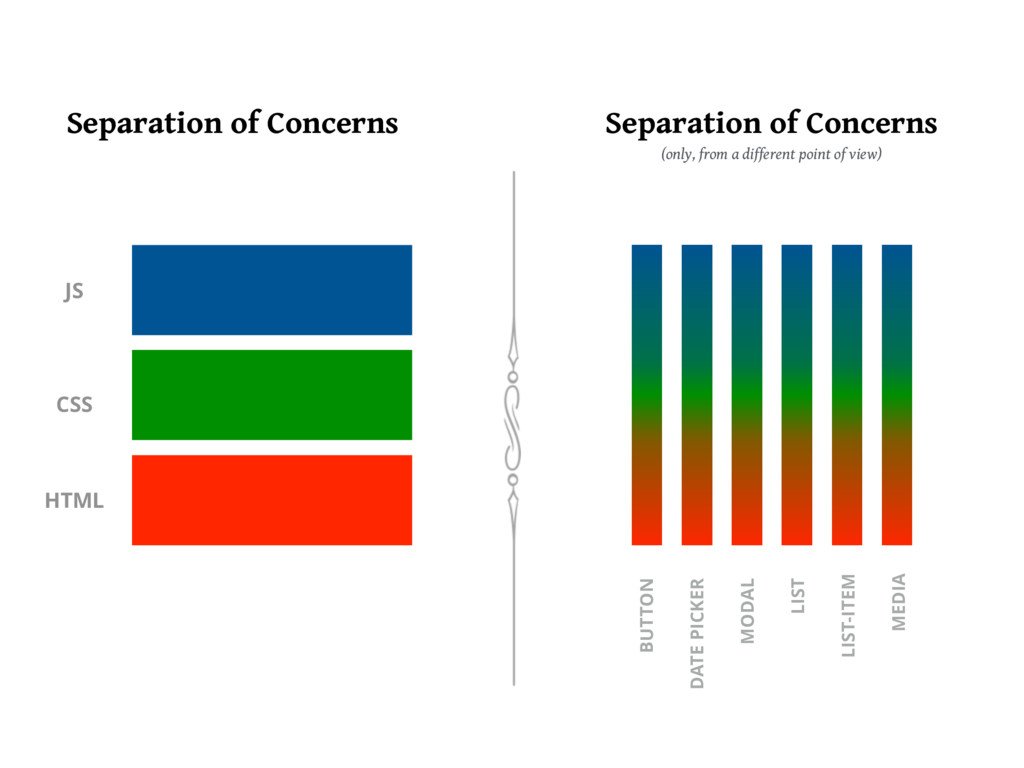
That’s right: we mixed them together into buckets that made sense, logically. All of a sudden, the styles of a button and the js for that button lived together. Revolutionary. 🎉
Additionally, most companies I’ve worked for have product engineers in feature teams that own a part of the product top to bottom. There’s no split in “backend engineers”, “frontend engineers” and the “ux team”. Instead, there’s the dashboards team and the replays team and the billing team, consisting of frontend and backend engineers alike, as well as dedicated designers and product contacts. They fully own their domain, making decisions on what to ship and how to ship it. It would also make sense if we’d organize the codebase like that - so that every team has a dedicated space for “their” code.
So what happens if we apply the same principles to structuring our codebase? We don’t separate js and css, we don’t separate frontend and backend engineers, so why do we do it to our components and hooks / utils ?
Every code does something, I hope hope hope (opens in a new window). If it doesn’t, it shouldn’t exist. Ideally, we can find out what code does, and then groups it together with logically similar code.
Everything widget related code goes into src/widgets/. That can be components, that can be hooks, types, utils, constants, whatever. It doesn’t matter what it is technically, the only thing that matters is what it does.
This often aligns with how teams are structured and how codeowners are set up, which is a nice side effect. For example, code owned by the profiling team can live in src/profiling/.
This grouping creates a vertical structure where you not only know where to find code as long as you know what you’re looking for, it also builds logical groups of code that changes together, thereby increasing cohesion.
Finding the right vertical grouping though is the hard part. It’s not an exact science, which is what makes it harder to adopt, because it’s not as clear-cut as “components go here, types go there”. You have to actually think about what a good grouping is.
Logical groups are often coupled to routes or pages, so that’s a good start. If you have a /dashboard page, start with this group. If a dashboard has widgets, they go there as well. It might be that widgets is large enough to warrant its own vertical, especially if those widgets are used on multiple routes. Maybe the /explore page can create widgets, too!
This is always the question that comes up first when this structure is proposed. Surely not every code is isolated enough to be put into a single vertical.
As I’ve hinted already, the solution is usually to make them their own vertical. For example, Sentry has a PageFilters component that is used on multiple pages. This is a perfectly valid vertical / domain on its own, even though it’s not what you’d usually call a “feature”. That’s why I’ve shied away from using that terminology.
Looking at how its currently structured, we have the component living in components/pageFilters (opens in a new window) and the types in types/core (opens in a new window). There’s also a util living in utils/withPageFilters (opens in a new window). 😭 This means pageFilters-related code isn’t easily discoverable, has no clear ownership and even small changes require some digging around first.
Moving that code together, into its own vertical, immediately increases cohesion, but doesn’t automatically reduce coupling. More than once, we’ve created a utility for a single feature, only to later discover it had been reused in unexpected places, making even small changes risky.
To fix that, we need boundaries: A way to declare which parts of a vertical are meant to be consumed by other verticals, and which parts are “private”. We need a public interface.
There’s no better way to achieve that than moving towards a monorepo. Every vertical gets its own package in the repo, with its own dependencies, and their public interface is defined in the package.json exports (opens in a new window) field. Now verticals can depend on each other, but it becomes explicit. I’ve found that pnpm workspaces (opens in a new window) are pretty good for this.
You can also create rules that some verticals can’t depend on others. Nx can do this out of the box (opens in a new window), but you don’t need a monorepo to create structure. At Sentry, we’ve started to use eslint-plugin-boundaries (opens in a new window) to enforce which parts can depend on what. For example, you can’t use deep imports (opens in a new window) from the private utils of our scraps Design System without triggering an eslint error.
There is no free lunch, so:
- Choosing the correct vertical for each piece of code is hard.
- Having “private” code runs the risk of multiple teams re-implementing the same things from scratch.
Both points require more communication between teams, and yeah, that’s the real hard part of being software engineers. Always has been. I never said this was gonna be easy, but my advice is still: Build out your codebase in verticals. The rest will follow.
That’s it for today. Feel free to reach out to me on bluesky (opens in a new window) if you have any questions, or just leave a comment below. ⬇️

