Why You Want React Query


- Earlier parts of the series are hidden
- #22: React Query and React Context
- #23: Why You Want React QueryCurrent
- #24: The Query Options API
- Later parts of the series are hidden
All 33 parts in the series
- #1: Practical React Query
- #2: React Query Data Transformations
- #3: React Query Render Optimizations
- #4: Status Checks in React Query
- #5: Testing React Query
- #6: React Query and TypeScript
- #7: Using WebSockets with React Query
- #8: Effective React Query Keys
- #8a: Leveraging the Query Function Context
- #9: Placeholder and Initial Data in React Query
- #10: React Query as a State Manager
- #11: React Query Error Handling
- #12: Mastering Mutations in React Query
- #13: Offline React Query
- #14: React Query and Forms
- #15: React Query FAQs
- #16: React Query meets React Router
- #17: Seeding the Query Cache
- #18: Inside React Query
- #19: Type-safe React Query
- #20: You Might Not Need React Query
- #21: Thinking in React Query
- #22: React Query and React Context
- #23: Why You Want React QueryCurrent
- #24: The Query Options API
- #25: Automatic Query Invalidation after Mutations
- #26: How Infinite Queries work
- #27: React Query API Design - Lessons Learned
- #28: React Query - The Bad Parts
- #29: Concurrent Optimistic Updates in React Query
- #30: React Query Selectors, Supercharged
- #31: Creating Query Abstractions
- #32: TanStack Router and Query
It’s no secret that I ❤️ React Query for how it simplifies the way we’re interacting with asynchronous state in our React applications. And I know a lot of fellow devs feel the same.
Sometimes though, I come across posts claiming that you don’t need it to do something as “simple” as fetching data from a server.
We don’t need all the extra features that React Query has to offer, so we don’t want to add a 3rd party library when we can just as easily fire a
fetchin auseEffect.
To some degree, I think that’s a valid point - React Query gives you a lot of features like caching, retries, polling, data synchronization, prefetching, … and about a million more that would go way beyond the scope of this article. It’s totally fine if you don’t need them, but I still think this shouldn’t stop you from using React Query.
So let’s instead look at the standard fetch-in-useEffect example that came up on Twitter (opens in a new window) lately, and dive into why it might be a good idea to use React Query for those situation, too:
function Bookmarks({ category }) { const [data, setData] = useState([]) const [error, setError] = useState()
useEffect(() => { fetch(`${endpoint}/${category}`) .then((res) => res.json()) .then((d) => setData(d)) .catch((e) => setError(e)) }, [category])
// Return JSX based on data and error state}If you think this code is fine for simple use cases where you don’t need additional features, let me tell you that I immediately spotted 🐛 5 bugs 🪲 hiding in these 10 lines of code.

Maybe take a minute or two and see if you can find them all. I’ll wait…
Hint: It’s not the dependency array. That is fine.
There are reasons why the official React docs (opens in a new window) recommend using either a framework or a library like React Query for data fetching. While making the actual fetch request can be a pretty trivial exercise, making that state available predictably in your application is certainly not.
The effect is set up in a way that it re-fetches whenever category changes, which is certainly correct. However, network responses can arrive in a different order than you sent them. So if you change the category from books to movies and the response for movies arrives before the response for books, you’ll end up with the wrong data in your component.
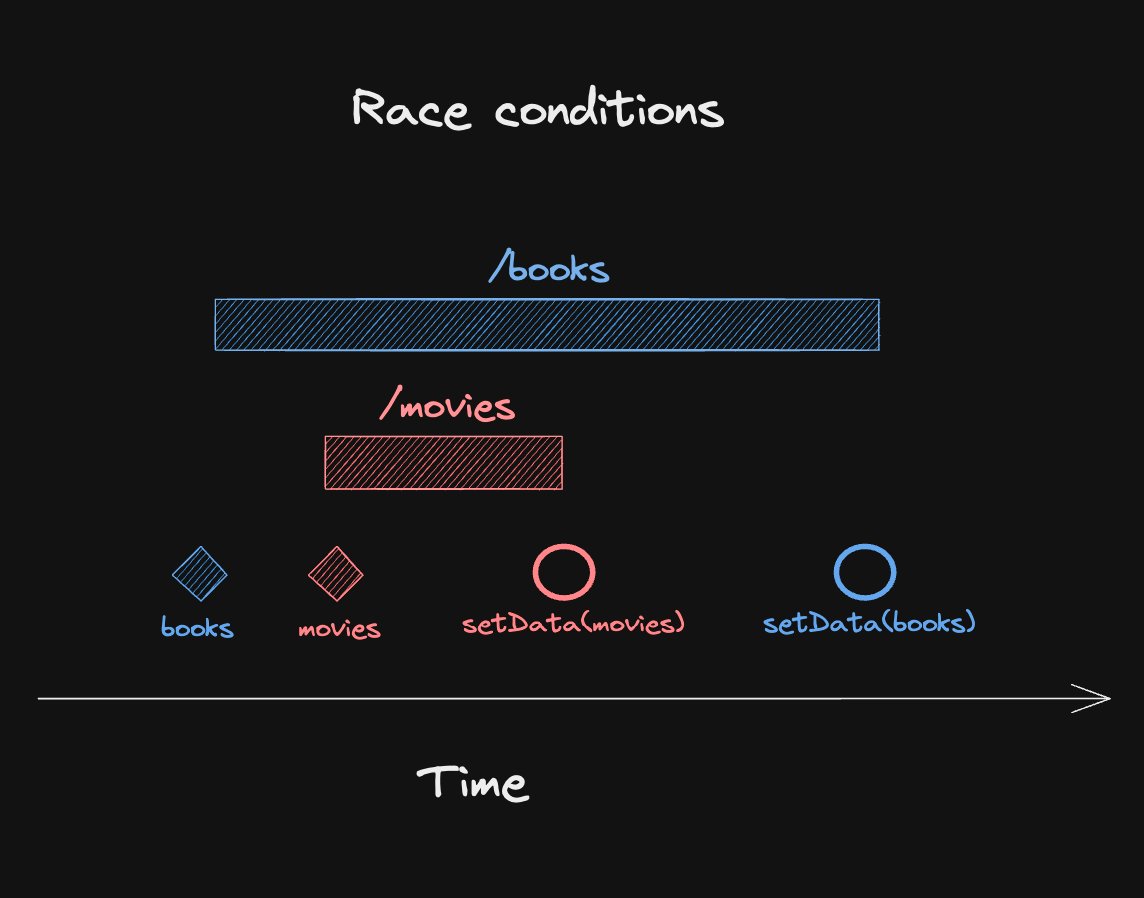
At the end, you’ll be left with an inconsistent state: Your local state will say that you have movies selected, but the data you’re rendering is actually books.
The React docs say that we can fix this with a cleanup function and an ignore boolean, so let’s do that:
function Bookmarks({ category }) { const [data, setData] = useState([]) const [error, setError] = useState()
useEffect(() => { let ignore = false fetch(`${endpoint}/${category}`) .then((res) => res.json()) .then((d) => { if (!ignore) { setData(d) } }) .catch((e) => { if (!ignore) { setError(e) } }) return () => { ignore = true } }, [category])
// Return JSX based on data and error state}What happens now is that the effect cleanup function runs when category changes, setting the local ignore flag to true. If a fetch response comes in after that, it will not call setState anymore. Easy peasy.
It’s not there at all. We have no way to show a pending UI while the requests are happening - not for the first one and not for further requests. So, let’s add that?
function Bookmarks({ category }) { const [isLoading, setIsLoading] = useState(true) const [data, setData] = useState([]) const [error, setError] = useState()
useEffect(() => { let ignore = false setIsLoading(true) fetch(`${endpoint}/${category}`) .then((res) => res.json()) .then((d) => { if (!ignore) { setData(d) } }) .catch((e) => { if (!ignore) { setError(e) } }) .finally(() => { if (!ignore) { setIsLoading(false) } }) return () => { ignore = true } }, [category])
// Return JSX based on data and error state}Initializing data with an empty array seems like a good idea to avoid having to check for undefined all the time - but what if we fetch data for a category that has no entries yet, and we actually get back an empty array? We’d have no way to distinguish between “no data yet” and “no data at all”. The loading state we’ve just introduced helps, but it’s still better to initialize with undefined:
function Bookmarks({ category }) { const [isLoading, setIsLoading] = useState(true) const [data, setData] = useState() const [error, setError] = useState()
useEffect(() => { let ignore = false setIsLoading(true) fetch(`${endpoint}/${category}`) .then((res) => res.json()) .then((d) => { if (!ignore) { setData(d) } }) .catch((e) => { if (!ignore) { setError(e) } }) .finally(() => { if (!ignore) { setIsLoading(false) } }) return () => { ignore = true } }, [category])
// Return JSX based on data and error state}Both data and error are separate state variables, and they don’t get reset when category changes. That means if one category fails, and we switch to another one that is fetched successfully, our state will be:
data: dataFromCurrentCategoryerror: errorFromPreviousCategoryThe result will then depend on how we actually render JSX based on this state. If we check for error first, we’ll render the error UI with the old message even though we have valid data:
return ( <div> { error ? ( <div>Error: {error.message}</div> ) : ( <ul> {data.map(item => ( <li key={item.id}>{item.name}</div> ))} </ul> )} </div>)If we check data first, we have the same problem if the second request fails. If we always render both error and data, we’re also rendering potentially outdated information . 😔
To fix this, we have to reset our local state when category changes:
function Bookmarks({ category }) { const [isLoading, setIsLoading] = useState(true) const [data, setData] = useState() const [error, setError] = useState()
useEffect(() => { let ignore = false setIsLoading(true) fetch(`${endpoint}/${category}`) .then((res) => res.json()) .then((d) => { if (!ignore) { setData(d) setError(undefined) } }) .catch((e) => { if (!ignore) { setError(e) setData(undefined) } }) .finally(() => { if (!ignore) { setIsLoading(false) } }) return () => { ignore = true } }, [category])
// Return JSX based on data and error state}Okay, this is more of an annoyance than a bug, but it’s definitely something that catches new React developers off guard. If your app is wrapped in <React.StrictMode>, React will intentionally call your effect twice (opens in a new window) in development mode to help you find bugs like missing cleanup functions.
If we’d want to avoid that, we’d have to add another “ref workaround”, which I don’t think is worth it.
I didn’t include this in the original list of bugs, because you’d have the same problem with React Query: fetch doesn’t reject on HTTP errors, so you’d have to check for res.ok and throw an error yourself.
function Bookmarks({ category }) { const [isLoading, setIsLoading] = useState(true) const [data, setData] = useState() const [error, setError] = useState()
useEffect(() => { let ignore = false setIsLoading(true) fetch(`${endpoint}/${category}`) .then((res) => { if (!res.ok) { throw new Error('Failed to fetch') } return res.json() }) .then((d) => { if (!ignore) { setData(d) setError(undefined) } }) .catch((e) => { if (!ignore) { setError(e) setData(undefined) } }) .finally(() => { if (!ignore) { setIsLoading(false) } }) return () => { ignore = true } }, [category])
// Return JSX based on data and error state}Our little “we just want to fetch data, how hard can it be?” useEffect hook became a giant mess of spaghetti code 🍝 as soon as we had to consider edge cases and state management. So what’s the takeaway here?
Data Fetching is simple.
Async State Management is not.
And this is where React Query comes in, because React Query is NOT a data fetching library - it’s an async state manager. So when you say that you don’t want it for doing something as simple as fetching data from an endpoint, you’re actually right: Even with React Query, you need to write the same fetch code as before.
But you still need it to make that state predictably available in your app as easily as possible. Because let’s be honest, I haven’t written that ignore boolean code before I used React Query, and likely, neither have you. 😉
With React Query, the above code becomes:
function Bookmarks({ category }) { const { isLoading, data, error } = useQuery({ queryKey: ['bookmarks', category], queryFn: () => fetch(`${endpoint}/${category}`).then((res) => { if (!res.ok) { throw new Error('Failed to fetch') } return res.json() }), })
// Return JSX based on data and error state}That’s about 50% of the spaghetti code above, and just about the same amount as the original, buggy snippet was. And yes, this addresses all the bugs we found automatically:
- 🏎️ There is no race condition because state is always stored by its input (category).
- 🕐 You get loading, data and error states for free, including discriminated unions on type level.
- 🗑️ Empty states are clearly separated and can further be enhanced with features like
placeholderData. - 🔄 You will not get data or error from a previous category unless you opt into it.
- 🔥 Multiple fetches are efficiently deduplicated, including those fired by
StrictMode.
So, if you’re still thinking that you don’t want React Query, I’d like to challenge you to try it out in your next project. I bet you’ll not only wind up with code that is more resilient to edge cases, but also easier to maintain and extend. And once you get a taste of all the features it brings, you’ll probably never look back.
A lot of folks on twitter mentioned missing request cancellation in the original snippet. I don’t think that’s necessarily a bug - just a missing feature. Of course, React Query has you covered here as well with a pretty straightforward change:
function Bookmarks({ category }) { const { isLoading, data, error } = useQuery({ queryKey: ['bookmarks', category], queryFn: ({ signal }) => fetch(`${endpoint}/${category}`, { signal }).then((res) => { if (!res.ok) { throw new Error('Failed to fetch') } return res.json() }), })
// Return JSX based on data and error state}Just take the signal you get into the queryFn, forward it to fetch, and requests will be aborted automatically when category changes. 🎉
That’s it for today. Feel free to reach out to me on bluesky (opens in a new window) if you have any questions, or just leave a comment below. ⬇️


